New features and enhancements that steadily enhance our Golf Shop product.
Golf Shop Product Updates
2025
August 2025 Updates: Round Custom Field enhancements, Display multiple logos on leaderboards, Golf Hub updates
Round Custom Field Enhancements
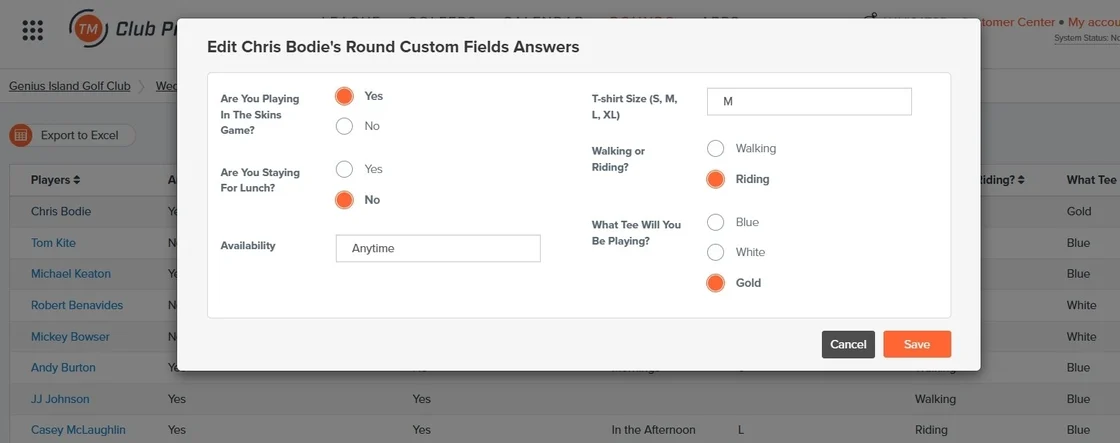
Earlier this year, we introduced Round Signups with Custom Fields, which included the ability to create and manage Round Custom Fields. Now, we're taking it a step further. You can now use Round Custom Field answers across key tools, including:
Report Composer
Scorecard Composer
Page Composer
Spreadsheet Composer
Round Emails
Round Text Messages
Display in Pairings
Additionally, managers can edit Round Custom Field answers in the manager site, making updates faster and seamless.
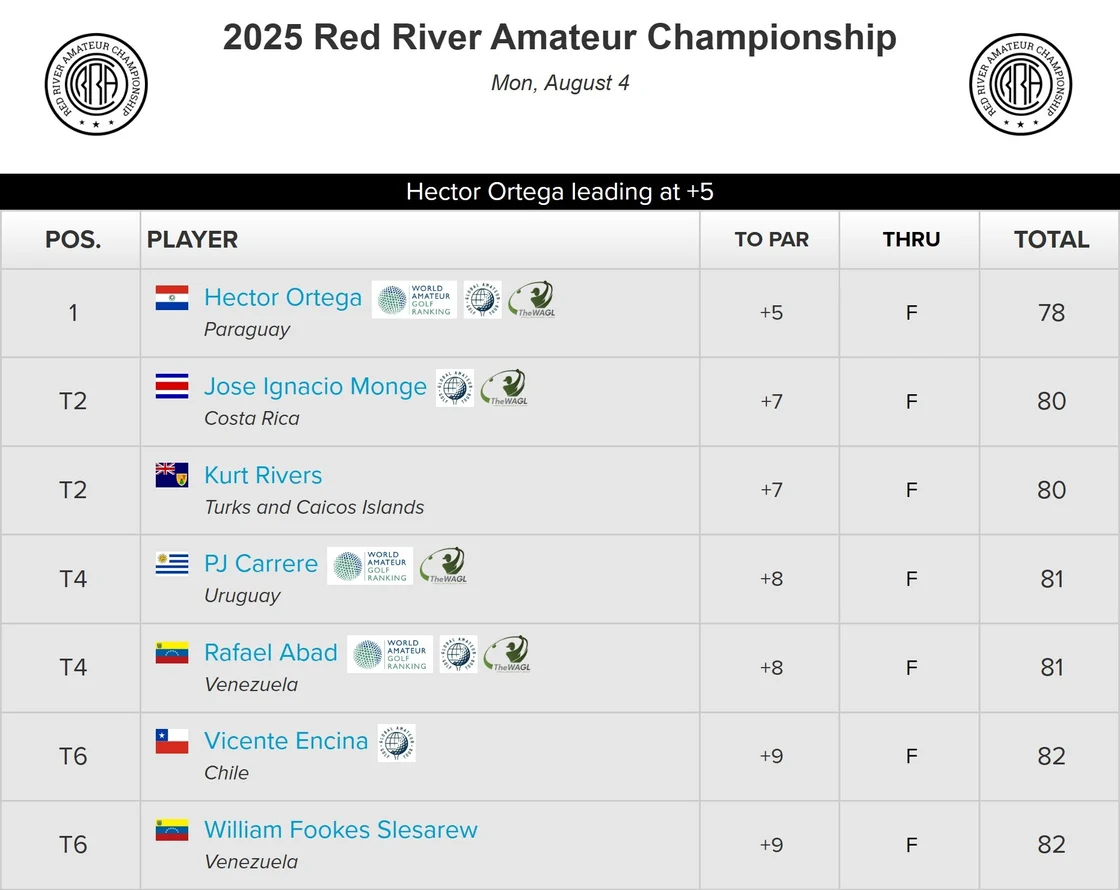
Managers can now display multiple custom player logos on the leaderboard for individual formats. Whether it's sponsor recognition, team branding, or event partners, you have full control over how your leaderboard looks. Elevate your next event with a leaderboard that truly stands out.
May 2025 Updates: Combined Team Index on Pending Registration and Waitlists, Registration for Non-Golf Related Events, Round Signups with Custom Fields
Combined Team Index on Pending Registration and Waitlists
We're excited to announce new improvements to Pending Registration and Waitlists. For team registrations, the combined team Handicap Index® has a new sortable column to make managing Pending Registrations and Waitlists easier. Additionally, managers can choose to show affiliation, and we've added a timestamp to see exactly when Handicap Indexes® were last updated.
In response to requests we have received from our customers who would like to use Tournament Management's robust registration system instead of another platform for seminars, meetings, or other non-golf-related events, we are introducing a new option to create Non-Golf Events.
This new option changes the terminology from golfers/players to participants for customer-facing functions like Registration and in other areas of the manager site. We also removed the golf-related functions from the menus, like pairings, scorecards, etc., while keeping key functionality like custom portals, communication tools, and reports.
At Golf Genius, we're always gathering feedback on our products, and the most requested Tournament Management feature is the ability to collect custom field answers using Round Signups. Managers looking to collect important details like tee choice, lunch attendance, preferred tee time, walking or riding, and contest participation have been forced to use alternative methods to gather this information for their League rounds.
With a similar look and feel to Event Registration, golfers will be prompted to answer custom fields after accepting a round invitation or signing up via the portal, giving them a seamless, personalized experience.
No more scrambling for last-minute information from your golfers. Easily utilize custom field answers in multiple areas within your League, saving you time and simplifying your day-of-play prep.
In addition, all customers will benefit from the new Round Signups Center, your centralized location for managing all things Round Signups, making navigation easier than ever.
Click here to learn more about Round Signups with Custom Fields.
Many clubs strive to provide equitable access to their most popular events, such as one-day Member-Guests. This can be challenging to manage, time-consuming, and prone to errors.
Using the new Lottery Management feature, clubs can run a lottery that takes into account all the events in a series and then prioritizes players who have yet to play in an event to the top of the list. The club can send invitation emails to the players, who then register for the event.
Do you run multiple events with a similar structure? For instance, each event may require the same basic setup, including registration, payments, and tournaments.
The Multi-Event Series feature facilitates the creation of similar events simultaneously while also enabling the propagation of registration setup, payments, and tournaments to all the associated events.
Have you ever forgotten to post scores to GHIN after a round? WHS requires that scores be posted on the same day of play to be considered for the PCC calculation, and missing this can result in incorrect handicap index calculations for your players.
GHIN customers can now enable automatic score posting to ensure all scores are posted on the day of play. You can view the score posting results in the round logs to confirm whether scores were successfully posted.
March 2025 Updates:Marketing Campaign Links, Gather Info from Event Coordinators
Marketing Campaign Links
Promote your upcoming events via email and text message using the Marketing Campaigns feature. Golfers can quickly access the Event Portal by clicking the link within the campaign message. Create, schedule, and monitor your campaigns from the Customer Center and watch your event participation grow. A Marketing Campaign allows golfers to seamlessly login and initiate registration, whether using Single Sign-On, Master Roster Registration or GGID.
Are you tired of chasing down event contacts for the correct golfer info, event logos, portal banners, and sponsor imagery for your upcoming events? Today, we introduce a new way to gather this information from your Event Coordinators and organize it in one central location, providing a convenient way for event contacts to provide assets for upcoming events. Simply invite an Event Coordinator to upload items and then manage the assets they provide directly within your upcoming event.
December 2024 Updates: Round Robin Tee Sheet Configuration, Visual Report Configuration, Golf Hub Flyers, Golf Hub Dashboard Tile
Round Robin Tee Sheet Configuration
We know how important flexibility is, and based on your feedback, we're excited to introduce the ability to configure the Round Robin Tee Sheet. The ability to configure this report enhances the Round Robin Scheduling feature, a tool often used for highly visible events, giving you more customization options to better suit your specific needs.
Click Here for more information in the Knowledge Base.
Visual Report Configuration
Managers have been able to create detailed reports using our powerful Report Composer for years. In addition to the familiar configuration table shown when running a report, we've added a report preview allowing you to instantly visualize changes, giving you confidence when printing reports the correct information is in the correct spot.
To further improve usability, we've implemented new hover and highlight features. Mousing over elements in the configuration table will highlight corresponding fields in the report preview, and vice versa, making navigation smoother and more efficient.
The new Flyers feature is an intuitive tool for quickly creating polished, professional-looking flyers. Select from an array of expertly designed templates, customize them easily, or unleash your creativity from a blank canvas using our comprehensive editor. Include QR codes on your flyers, for golfers to quickly access registration. Save or print your Flyers seamlessly, taking your event promotion to the next level.
To learn more about attracting new golfers using Golf Hub Flyers, Click Here.
Golf Hub Dashboard Tile
The new Golf Hub dashboard tile aims to improve awareness of the status of your Golf Hub page. Now you can create, access, and control your Golf Hub page directly from the dashboard making it easier to promote your Events and Leagues and increase participation.
Remember, registration with payment processing is available using Golf Hub for all TM customers!
August 2024 Updates: Golf Genius Hub, Flyers Feature
Golf Genius Hub
Introducing, Golf Genius Hub - a new platform designed to connect golfers with available golf opportunities worldwide. This “global hub” allows golfers to easily search, register, pay, and view results online.
Publishing events to Golf Genius Hub is a feature already included in Tournament Management. Simply create a Golf Hub page and choose where you want the page to appear.
Golf Hub pages can be displayed in multiple hubs and you can control which hubs to display your events in simply by checking the box. For more details about Golf Hub, Click Here.
Flyers Feature
An intuitive tool for creating polished Flyers in minutes. Select from our array of expertly designed templates, customize them with ease, or unleash your creativity from a blank canvas using our comprehensive editor. Save or print your Flyers seamlessly, taking your event promotion to the next level.
To learn more about attracting new golfers using Golf Hub Flyers, Click Here.
July 2024 Updates: Marketplace Updates, Team Match Play Scorecard, Enter Hole by Hole Match Play Results via Mobile App
Marketplace Update
The Golf Genius Marketplace is a showcase of complementary partners and products that benefit the Golf Genius community. From the Marketplace, you can review the available products, features, and required permissions for use. These additional tools will help to enhance any operation.
Players 1st
We're excited to announce that our integration with Players 1st, the leading Customer Experience Management solution for golf, is here!
Players 1st is used by over 3,000 clubs, golf associations, and federations worldwide to survey golfers on all aspects of the tournament experience, gather and analyze feedback, provide real-time insights and alerts, and benchmark the results. Click the video below to learn more about the Players 1st integration with Tournament Management.
Click Here for more information in the Knowledge Base.
Best Approach
Best Approach has partnered with Golf Genius to offer custom booklets printed and delivered for your next event. And now, the Round Robin Tee Sheet report can be exported in a format designed for the Best Approach event book.
Click Here for more information in the Knowledge Base.
Team Match Play Scorecard
Multiple matches played within the same pairing group can make printing scorecards confusing and frustrating. You can now print a single scorecard showing a four-ball match and multiple singles matches on one scorecard all handicapped correctly using the new Team Play Matches Scorecard. This scorecard, found in the Report Center, can be used for one team match and up to four singles matches on one scorecard.
Click Here for more information in the Knowledge Base.
Enter Hole by Hole Match Play Results via Mobile App
Match Play competitions do not require scores; the golfers only need to agree on the outcome of each hole and the overall match.
Golfers can now enter hole-by-hole match results instead of hole scores in the mobile app when scoring a match play event by simply selecting the winner of each hole or marking the hole as tied.
As a manager, you can view and enter hole-by-hole match results on the Enter Scores Page. Please contact support to have this feature enabled.
Click Here for more information in the Knowledge Base.
Additional Enhancements
Display Number of Teams Registered in the Event Dashboard Learn More
Import Specific Tees from Course Rating Directory Learn More

%20blurred.webp)


